
ABOUT THIS GAME
Play Pixel Runner Online
Pixel Runner is a colorful pixel-style running game where movement, jumping, obstacle avoidance, and star collecting all come together in a simple arcade challenge.
Guide your character through the course, move when necessary, jump over hazards, and collect stars placed along the route. The stars you earn are more than just collectibles—they can also be used to unlock different character skins.
The controls are easy to understand, making Pixel Runner quick to start, while improving your score requires better timing, awareness, and movement.
How to Play Pixel Runner
Your goal is to keep moving through the map, avoid obstacles, collect stars, and achieve the best score you can.
1. Start from the Main Menu
The main menu shows your current star balance in the upper-right corner. From here, you can start the game, check your scores, adjust settings, and access character customization.

Use the main menu to start playing, check your score, or customize your character.
2. Check Your Score and Ranking
Tap the score/ranking icon on the main menu to open the ranking screen.
The leaderboard displays rank and score information, allowing you to see the scores you can aim to beat. As you become more familiar with the movement and obstacles, you can use the ranking screen as a simple benchmark for improving your runs.
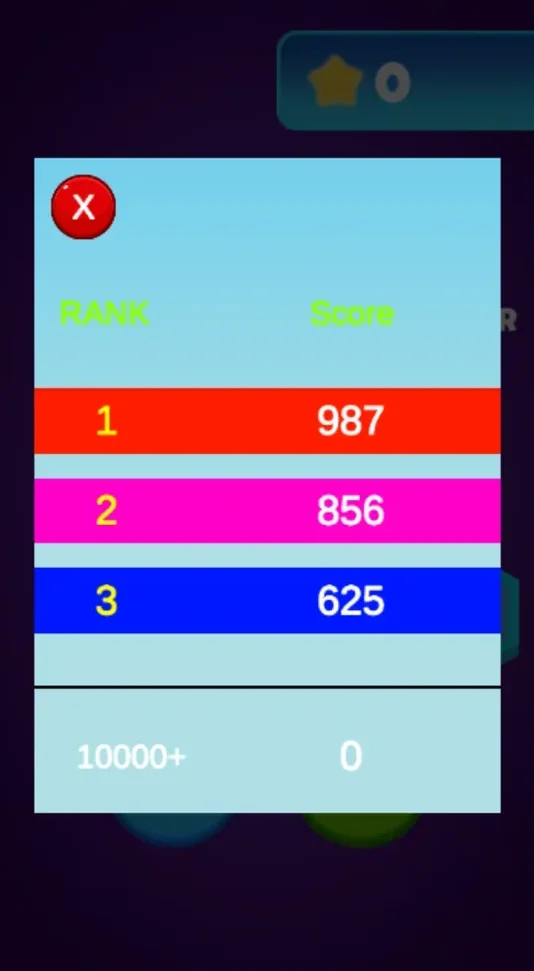
Open the ranking screen to view scores and set a target for your next run.
3. Move Through the Map and Jump Over Obstacles
Once the game starts, use the movement buttons to control your character's position.
The directional controls let you move through the course, while the large JUMP button allows you to jump over obstacles and dangerous sections of the map.
Watch the route ahead carefully. Good positioning before an obstacle can make the next jump much easier.

Use the movement controls to position your character and press Jump to avoid obstacles.
4. Collect Stars
Stars appear throughout the game map. Move toward them and collect as many as you safely can while continuing through the course.
Your current star total is displayed during gameplay and on the menu. Collecting stars gives you an additional objective beyond simply progressing through the level.
Stars also act as the currency used to unlock character skins.
5. Unlock and Change Character Skins
Tap the character in the center of the main menu to open the skin selection screen.
Use the arrows to browse different pixel characters. Locked skins display the number of stars required to unlock them.
If you have collected enough stars, you can spend them to unlock a new character appearance.

Collect stars during gameplay and spend them to unlock different pixel character skins.
Pixel Runner Game Features
- Simple movement controls: Use directional buttons to position your character on the course.
- Jump mechanic: Press the Jump button to clear obstacles and dangerous sections.
- Collectible stars: Pick up stars while exploring the game map.
- Unlockable skins: Spend collected stars to unlock different character appearances.
- Score and ranking system: Check scores and use them as targets for future runs.
- Colorful pixel environments: Run through an isometric world built with blocky pixel-style graphics.
- Quick arcade gameplay: Easy controls make the game simple to start while timing and positioning become more important as you play.
Movement and Obstacle Avoidance
Movement is an important part of Pixel Runner. Instead of focusing only on moving forward, pay attention to where your character is positioned relative to the path, obstacles, and collectible stars.
When an obstacle approaches, decide whether you need to reposition first or jump immediately. A well-timed jump can clear the hazard while allowing you to continue toward nearby stars.
Try to look slightly ahead of your character rather than reacting only when an obstacle is directly in front of you.
Collecting Stars and Unlocking Skins
Stars connect the gameplay and customization systems.
During a run, stars are placed along the route for you to collect. Your accumulated star balance can then be used from the character selection screen.
Different skins can require different amounts of stars. This gives you a reason to continue collecting stars even after you become comfortable with the basic movement controls.
Instead of being only a score objective, the collectibles contribute directly to unlocking new visual options for your character.
What Skills Can Pixel Runner Help You Practice?
Pixel Runner is designed as a casual arcade game, but its mechanics involve several common gameplay skills.
Reaction Time
Obstacles require you to recognize danger and decide when to jump or reposition your character.
Timing
Jumping too early or too late can make an obstacle more difficult to clear. Repeated runs help you become more familiar with when to use the jump button.
Hand-Eye Coordination
You need to watch the course while using movement controls and the jump button, connecting what you see on screen with your next input.
Spatial Awareness
The isometric map requires you to judge your character's position relative to the road, nearby hazards, and collectible stars.
Attention and Focus
Stars can attract your attention, but obstacles still need to be avoided. Successful runs reward players who can track collectibles without losing awareness of the path ahead.
Tips for Playing Pixel Runner
- Watch the path ahead. Identifying obstacles early gives you more time to prepare your movement or jump.
- Position before jumping. Make sure your character is lined up safely before trying to clear a difficult section.
- Collect stars when it is safe. Stars are useful for unlocking skins, but avoiding obstacles should remain your first priority.
- Do not wait until the last moment to react. Earlier decisions generally give you more control over your movement.
- Check your score after runs. Use the ranking screen to see what score you want to beat next.
- Save stars for skins you want. Browse the character selection screen before deciding which skin to unlock.
Why Play Pixel Runner?
Pixel Runner combines straightforward arcade controls with collectibles and character customization.
The immediate objective is easy to understand: move through the map and avoid obstacles. Collectible stars add another layer by encouraging you to explore useful routes and build up currency for new skins.
The score system also gives repeated runs a clear purpose. As your timing and movement improve, you can try to travel farther, collect more stars, and work toward a better score.
Play Pixel Runner Online
Start a run, use the movement controls to navigate the course, and press Jump when you need to clear an obstacle.
Collect stars as you travel through the pixel world, check your scores between runs, and use the stars you earn to unlock new character skins.
See how far you can go and how many stars you can collect in Pixel Runner.