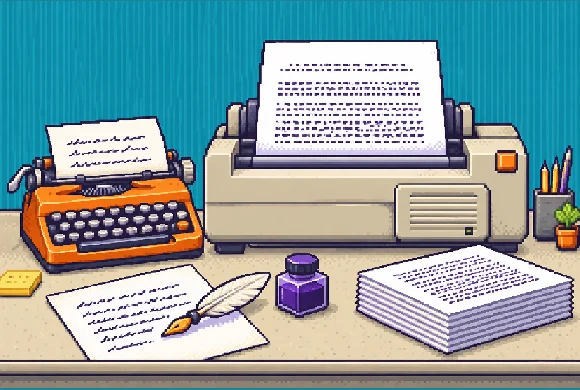
ABOUT THIS GAME
Play Pixel Printcremental Game Online
Printcremental gives you a simple first goal: fill a page before your ink runs out. Hold PRINT, watch your pen, and release in time to dip it again. Spend your earnings on more ink, a better nib, and eventually a typewriter with its own rhythm to learn. Choose Printcremental if you enjoy improving a timing result and deciding which upgrade will make your next session more productive. Expect to stay involved: Printcremental asks you to watch, release, and fix problems as they appear.
| Detail | What to expect |
|---|---|
| Game | Printcremental |
| Category / tags | Simulation · Incremental · Timing · Retro Pixel Art |
| Your goal | Print pages and buy better equipment |
| Main input | Hold and release PRINT |
| Session pressure | A virus advances toward the drive head |
| Tools to learn | Pen and typewriter |
| Orientation | Portrait and landscape |
| Available on Pixel Game | November 1, 2026 |
How to Play Printcremental
- Tear into your first session. Select Tear to Start on Printcremental's opening paper, then close the opening message with OK.
- Hold PRINT to write. Use the large orange button at the bottom right. Your first Printcremental tool is a pen; watch writing appear on the sheet.
- Release on your tool's cue. With a pen, aim for the gold timing zone as ink fades. With a typewriter, listen for the bell and release at the last space before the margin. Use Printcremental's PERFECT feedback to refine your next attempt.
- Finish pages and check your cash. Keep working through the sheet, then compare your earnings with available upgrades.
- Spend and try again. Printcremental sessions can end when the virus catches up or your supplies run out. Use what you earned to improve your setup before another attempt.
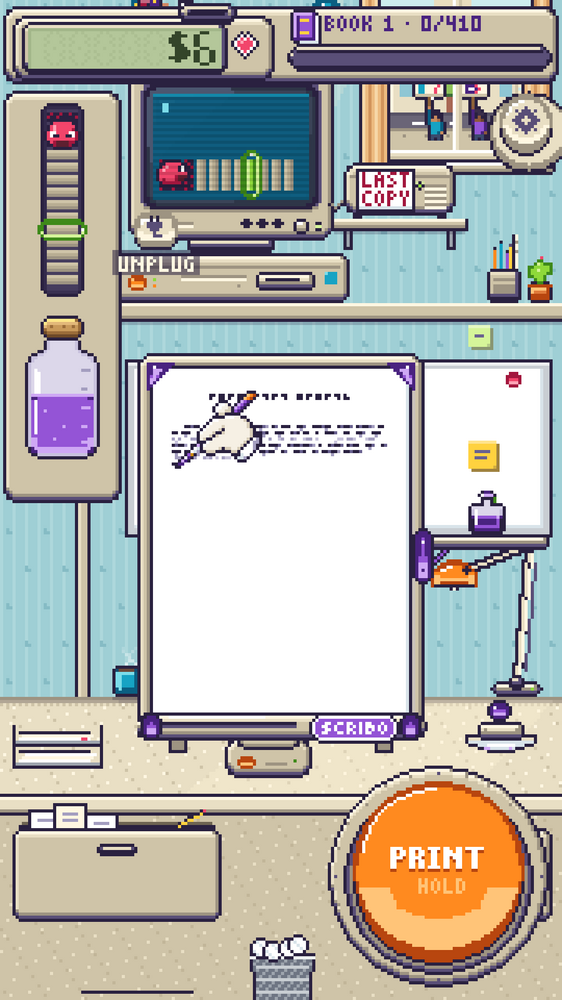
Hold PRINT to start writing. Watch your ink and the marks on your page before letting go.
Printcremental Controls
Start Printcremental with one input: hold PRINT to work, then release when your tool signals. Learn that timing before spending on faster equipment.
On a keyboard, click inside Printcremental first, then hold and release Space to perform the same action. On a touchscreen, keep your finger on PRINT and lift it to release.
| Control / cue | What to do |
|---|---|
| Tear to Start | Open your Printcremental session |
| Hold the orange PRINT button | Keep your current tool writing or printing |
| Hold / release Space | Use the main action from a keyboard |
| Release PRINT | Stop holding and check your timing feedback |
| Pen's gold timing zone | Release to aim for PERFECT and dip your pen |
| Typewriter bell | Prepare to release at the final space |
| Tap an ink blot / press PRINT | Clear a blot and resume writing |
| Tap the ribbon spool prompt | Replace a depleted ribbon when you have a spare |
| Upgrade tree | Inspect connected equipment and upgrade choices |
Choose Your Next Printcremental Upgrade
Learn a new cue with each Printcremental device
Printcremental's pen stage gives you a limited number of dips per session. Releasing dips your pen again, so letting go too early wastes usable ink. Hold until the gold zone approaches, then lift before your nib runs dry. If a blot stops Printcremental's writing, tap it or press PRINT to clear it.
Printcremental's typewriter asks for a different rhythm. The bell warns that a line is nearly finished; release in its final word gap before the margin. Watch the typing strip as well as listening. Printcremental can grade an early return differently from a clean final-space release.
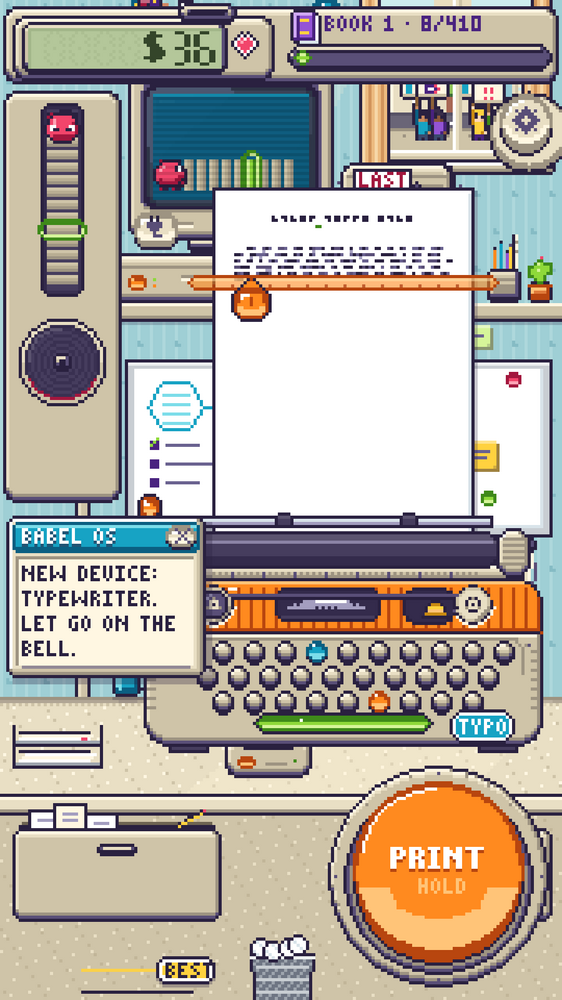
After the bell, watch for the last space. Release before the margin to aim for a PERFECT line.
Look ahead before buying a Printcremental upgrade
Open Printcremental's upgrade screen and follow a connected branch. Check your cash, select an upgrade, and compare its effect with what stopped your last session. Buy more dips if ink keeps running out; consider a better nib when you want each dip to cover more rows.
| Printcremental upgrade | What changes for your next attempt |
|---|---|
| Bigger Inkwell | Adds another dip per level |
| Steel Nib | Increases how many rows one dip can write |
| Steady Hand | Speeds up handwriting |
| Blotter | Lets ink blots dry without manual clearing |
| Laid Paper | Increases page earnings |
| Long Ribbon | Extends ribbon capacity |
| Spare Spools | Gives you replacement ribbons |
| Quick Feed | Speeds up the typewriter's return |
| Electric | Returns automatically when you keep holding at margin |
| Carbon Paper | Adds a copy to each typed page |
To reach Printcremental's typewriter, finish the pen branch's required upgrade levels. If that purchase stays locked, inspect the connected prerequisites and their remaining levels. In Printcremental's typewriter stage, watch your ribbon and tap its spool prompt when a replacement is needed.
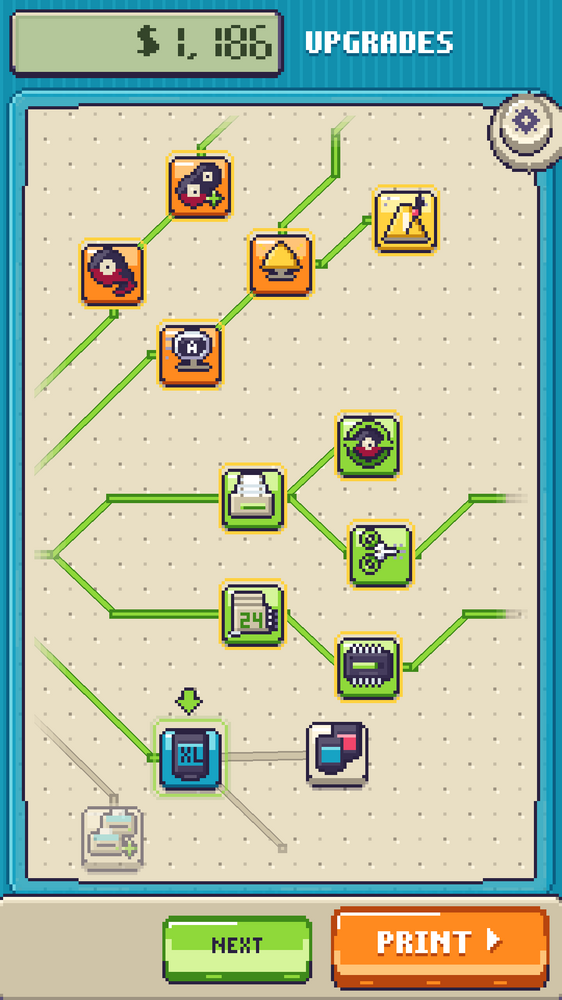
Follow a connected branch, inspect your next choice, and compare it with your available money.
Use your Printcremental report to choose what comes next
Check why your Printcremental session ended before buying again. An empty inkwell points toward more dips or better use of each dip. A depleted typewriter ribbon makes Long Ribbon or Spare Spools worth checking. If Printcremental keeps reporting early or late releases, adjust your timing on another page before expecting faster equipment to solve it.
Aim for one clear change in your next Printcremental session: fewer blots, another finished page, or a cleaner typewriter line. Compare that result with your last report, then choose your next purchase.
What Can You Practice in Printcremental?
Printcremental asks you to connect a visual or sound cue with a release. Compare an early result with a better-timed attempt, then adjust your next hold. Printcremental's upgrade choices also give you a reason to compare costs and decide what you want to try next.
Tips for Playing Printcremental Online
- Start by watching one cue. In Printcremental's pen stage, focus on ink before scanning every part of your desk.
- Read feedback after releasing. Use Printcremental's timing result to adjust your next attempt.
- Save your dips. In Printcremental, an early release uses another dip before your current ink is fully spent.
- Use the bell as a warning. Then watch Printcremental's typing strip for the last space before the margin.
- Aim for a fault-free page. Printcremental awards CLEAN PAGE feedback and a better payout when you avoid faults.
- Read new device messages. A Printcremental upgrade can change what you should watch or listen for.
- Give each purchase a goal. Inspect a branch before spending, then test your choice in another session.
- Treat a session ending as your next decision point. Printcremental lets you spend your earnings and go again.
Is Printcremental Worth Playing?
Printcremental suits players who like a simple input with something to learn: judge a cue, improve a result, and buy another tool. A page filling with print gives you immediate feedback, while a branching upgrade screen offers a longer goal.
Expect to stay involved with Printcremental's timing. The advancing virus adds pressure even though your main action is just holding and releasing. Try Printcremental's first page if retro desks, mechanical printing, and repeated upgrade decisions sound appealing. That first round will tell you whether you enjoy its rhythm.
Play Printcremental Online
Start Printcremental in the player above. Use fullscreen for more room to see your page and gauges, then hold PRINT and follow your first release cue. Finish a Printcremental session, check what slowed you down, and choose one improvement before starting again. For another upgrade-focused session afterward, try Home Builder Clicker or browse more simulation games.
Printcremental FAQs
Which Printcremental upgrade should I buy first?
Start with Printcremental's Bigger Inkwell if you need more dips per session. Then compare Steel Nib for more rows per dip with Steady Hand for faster writing. Follow connected upgrades and check their remaining levels when working toward a typewriter.
How do I start writing in Printcremental?
Choose Tear to Start, close the opening message, and hold the large orange PRINT button. Watch your page and ink as you write.
When should I release PRINT in Printcremental?
With Printcremental's pen, release in the gold zone before the nib runs dry. With a typewriter, listen for the bell, then release at the final space before the margin.
What happens when the Printcremental virus catches up?
Your current session ends. Spend what you printed on upgrades, then begin another Printcremental session. Running out of ink or ribbon can also end a session, so check the report's reason.
Does Printcremental play itself?
Expect active holding and releasing in Printcremental. Watch your tool's cues and check its prompts when you change equipment.