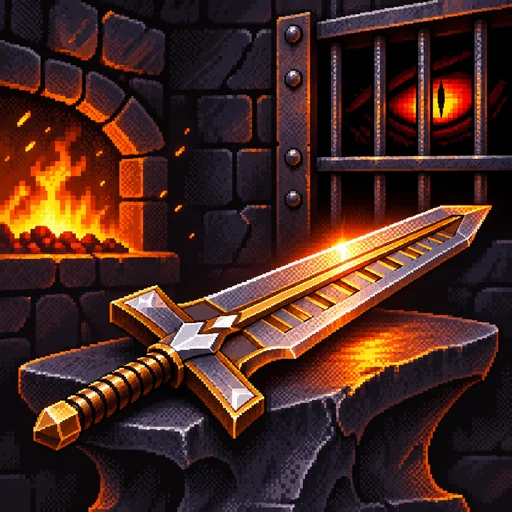
ABOUT THIS GAME
Play Pixel Dream Forge Game Online
Dream Forge is a pixel-style forging game about making every blade count. Pick a sword from Storage, tap the anvil, and check what your next strike could cost you. If the blade is already worth enough to pay the dragon, set it aside. If you have value to spare, decide whether to risk another swing or save the sword for a relic.
| Detail | What to expect |
|---|---|
| Game | Dream Forge |
| Category / tags | Simulation · Pixel Style · Forging Roguelite |
| Your goal | Meet the dragon's daily sword-value quota |
| Modes | 21-day pact, then Endless Mode |
| Main inputs | Click or tap to strike, drag to move swords |
| Platform / orientation | Web browser · Portrait |
| Available on Pixel Game | November 5, 2026 |
How to Play Dream Forge
- Tap the highlighted blade in Storage. Dream Forge opens on Day 1 and points you to your first sword. Follow the tutorial to the anvil.
- Strike and watch the result. Click or tap the blade on the anvil. Check the result, the new value, and the odds for your next hit. Dream Forge can raise your blade's level, leave it where it is, damage it, or break it.
- Use the back arrow when the blade is worth keeping. Back at the offering counter, drag it from Storage into the area above Offer. Watch the Offered total change before you commit.
- Meet the Quota and select Offer. Day 1 asks for 1,800 in sword value. Add another blade if the first falls short. When the green check appears next to Offered, you have enough to hand over the blades and move on. Leave spare swords in Storage.
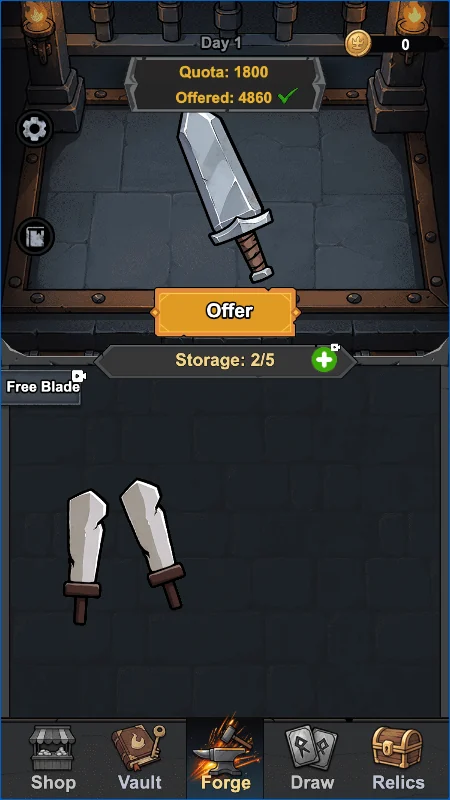
Look for the green check beside Offered before you hand over your swords.
Dream Forge Controls and Strike Feedback
| Control or cue | What to do |
|---|---|
| Click or tap a sword in Storage | Take that blade to the anvil |
| Click or tap the blade on the anvil | Make one strike and read the result |
| Odds | Check the chances of each outcome before the next hit |
| Back arrow at the anvil | Stop forging and return to the previous screen |
| Drag a sword between areas | Move it into the offering area or back into Storage |
| Offer | Hand over the swords you've placed in the offering area |
Success and Critical improve the blade. Hold leaves it at its current level in the basic roll. Damage can cost levels, and Break can take the sword out of play. Some Dream Forge relics change those outcomes or give you a bonus when they happen, so check the updated value after each strike.
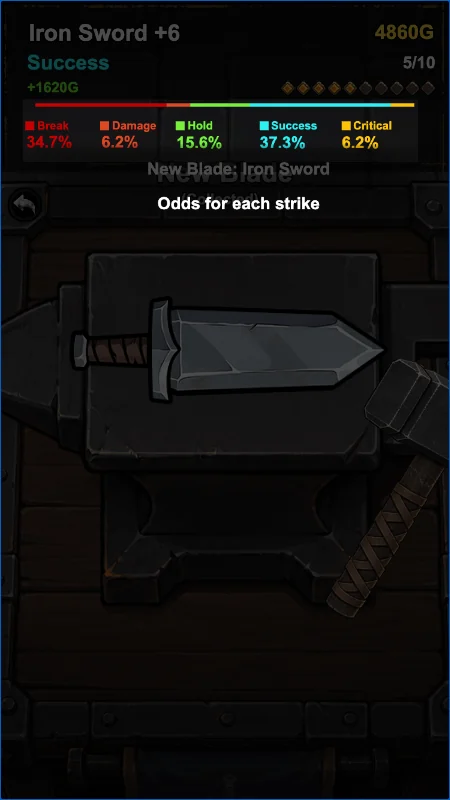
Read the red Break percentage before risking another hit. The diamonds above the odds track Fever charge.
Dream Forge Modes, Relics, and Blade Collection
Finish the pact, then choose whether to keep going
Dream Forge starts you on the dragon's 21-day pact. Aim to cover each day's quota with the blades you have and watch how much gold you carry forward. After completing the pact, select Continue on the victory screen to enter Endless Mode. Choose Restart if you'd rather see whether a different relic build makes the pact easier.
Spend spare blades on relics
When Draw opens, sacrifice a spare blade there for Sword Coins, then use those coins to buy a relic. Keep enough value for the day's offering before making that trade. Check Relics for your equipped items and read their effects before spending. For example, Standing Stone turns each blade's first Break into Damage. Everflame Wick gives you more time to strike during Fever. Pick the one that helps with the risk you're actually taking.
Explore the Dream Forge blade families
Check Collection for the blades you've discovered and Vault to display a sword you want to keep. Try raising different blades to see what forms they reveal. Dream Forge has a Dragonfang line with forms such as Whelp Fang and Winged Wyrm, alongside stranger paths such as the Fishblade and World Tree families. Set your next collection goal after you've covered the quota.
What You Practice in Dream Forge
Dream Forge asks you to weigh the odds against what you stand to lose. A high-value blade can make another hit tempting, but it can also cover most of the quota by itself. Read the remaining gap, compare the value in Storage, and decide which blade you can risk. As you get relics, watch how their effects change the decision you would make with the same sword.
Tips for Playing Dream Forge Online
- Secure the day's tribute first. Drag enough value into the offering area to cover the quota. If you're curious about another upgrade, try it with a spare blade.
- Watch for 10 Fever charge. Once Fever starts, you get a brief window when the blade can't break. Use it for extra strikes and check your odds again when the window closes.
- Use supplies for a specific strike. Cracked Scale blocks a Break on the next strike and is consumed either way. Regret Spring can undo the last strike while you're still at the anvil, even if that hit broke the blade.
- Check Shop when it's open. Gold from offerings buys supplies. Read each effect before spending so the item helps with a blade or a quota you care about.
Is Dream Forge Worth Playing?
If you enjoy ForgeTax, Dream Forge has a similar decision at the anvil. Each strike can make a sword more valuable or leave you with less to offer. Both games make you choose between putting a blade toward the dragon's tribute and spending it on a relic that can help with future strikes.
Try that trade-off in Dream Forge's pixel-style browser forge. Tap the blade, read the odds above it, and drag your finished swords into the offering area. Once you've set aside enough for the quota, try spending a spare blade in Draw and see how your next relic changes what you do at the anvil.
Play Dream Forge Online
Open Dream Forge in the Pixel Game player above and tap the sword the tutorial highlights. The forge is laid out for portrait play, with the odds above your blade and the offering total above Storage. If you enjoy deciding where to spend your earnings between rounds, try Printcremental or browse more simulation games on Pixel Game.
Dream Forge FAQs
How do I know when to stop hammering in Dream Forge?
Compare the current blade value with the gap between Offered and Quota. If the blade covers that gap and you'd be short without it, use the back arrow and move it into the offering area.
What happens if I miss the quota?
Dream Forge counts a missed offering against the run and shows the defeat screen. Check the options there to see whether you can continue or need to restart. Check the Offered total before pressing Offer to avoid handing over too little.
How do I unlock Endless Mode in Dream Forge?
Complete the 21-day pact and choose Continue on the victory screen. Endless Mode keeps the daily offering loop going beyond the pact.
Can I play Dream Forge with a mouse or a touchscreen?
Yes. Click or tap the blade to strike, then drag swords between Storage and the offering area. The same visible controls work in a portrait browser player.